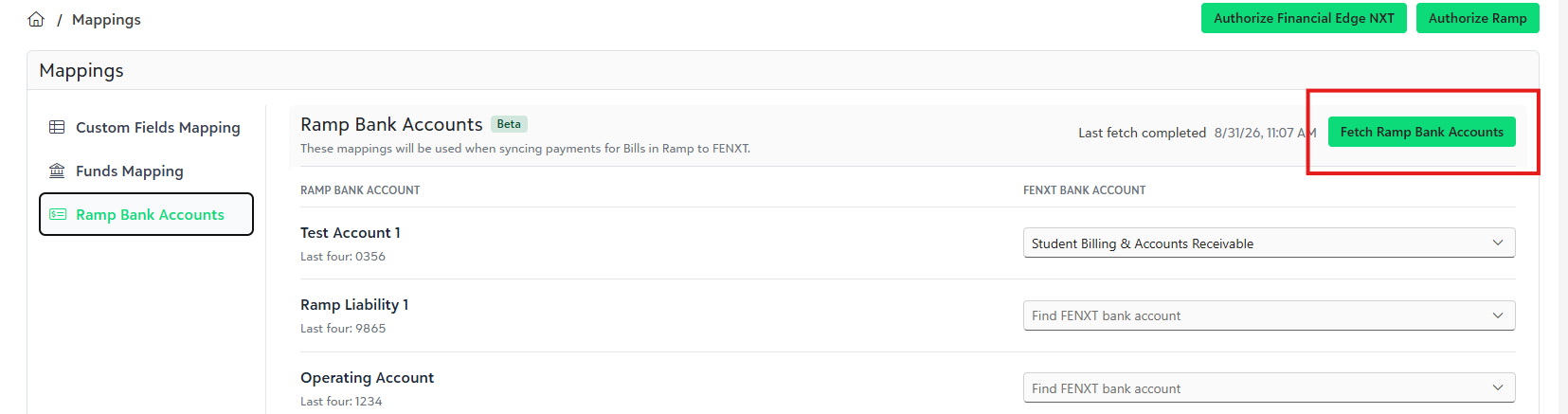

Go to:
Settings → Configuration → Bills
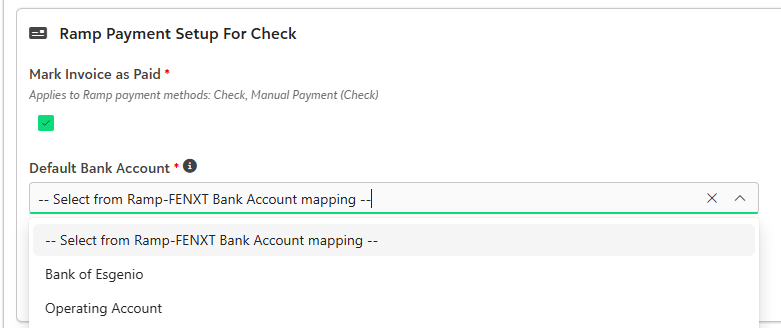
- Bank account mapping can be enabled for the applicable Bill Payment configurations.
Under Default Bank Account, select:
Select from Ramp-FENXT Bank Account mapping
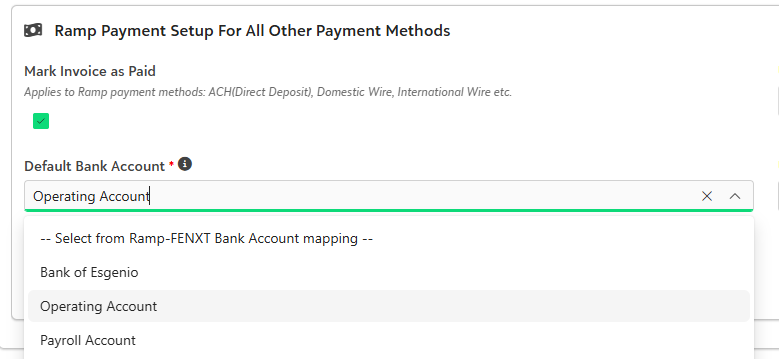
- For All Other Payment Methods, select the same option if you also want those payments to use your Ramp bank account mappings.
Save your changes.
How it works
Once configured, Ramp for FE determines the Financial Edge NXT bank account based on the bank account used for the bill payment in Ramp.
For example, if a bill is paid from Operating Account in Ramp:
Operating Account in Ramp
→Ramp for FE checks the bank account mapping
→Operating Account in Financial Edge NXT is used
If the Ramp bank account is not mapped, Ramp for FE uses the Default FENXT Bank Account instead.
So the selection order is:
Mapped FENXT Bank Account → Default FENXT Bank Account
Example-
| Ramp Bank Account | Financial Edge NXT Bank Account |
|---|---|
| Operating Account | Operating Account |
| Payroll Account | Payroll Account |
| Unmapped Account | Default FENXT Bank Account |
Was this article helpful?
That’s Great!
Thank you for your feedback
Sorry! We couldn't be helpful
Thank you for your feedback
Feedback sent
We appreciate your effort and will try to fix the article