There may be situations where you need to manually update the sync status of a transaction in Ramp. This is typically required when the transaction already exists in FENXT and should no longer appear in Ramp's Accounting section.
Warning: This action is permanent. Only update the sync status if the transactions already exist in FENXT. Updated transactions will no longer appear in Ramp's Accounting section.
Supported Transaction Types
You can update the sync status for:
- Credit Cards
- Reimbursements
- Bill Pay
Getting Started
1. Navigate to: Danger Zone --> Update Ramp-Sync Status
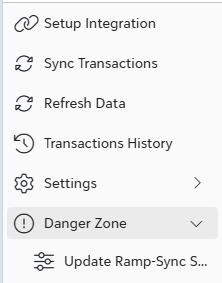
2. Select the appropriate transaction type:

3. Click on Get Latest Data from Ramp

Updating Sync Status
1. Once transactions are displayed, use the checkboxes to select the transactions you want to update.
Important: Only select the transactions you intend to update. Make sure to uncheck any transactions that should remain unchanged.
2. Update Sync Status in Ramp
For Bills Only - Update Payment Sync Status in Ramp should only be used in particular situations.
If you have questions, please reach out to help@rampforfe.com.
Was this article helpful?
That’s Great!
Thank you for your feedback
Sorry! We couldn't be helpful
Thank you for your feedback
Feedback sent
We appreciate your effort and will try to fix the article